🚀 Creating an Advanced Click-and-Drag Interactive Quiz Generator 🎯
🎓 Introduction
In today's 🌍 digital learning landscape, interactive 📜 quizzes play a crucial role in engaging 👩🎓 students and reinforcing 🧠 concepts.
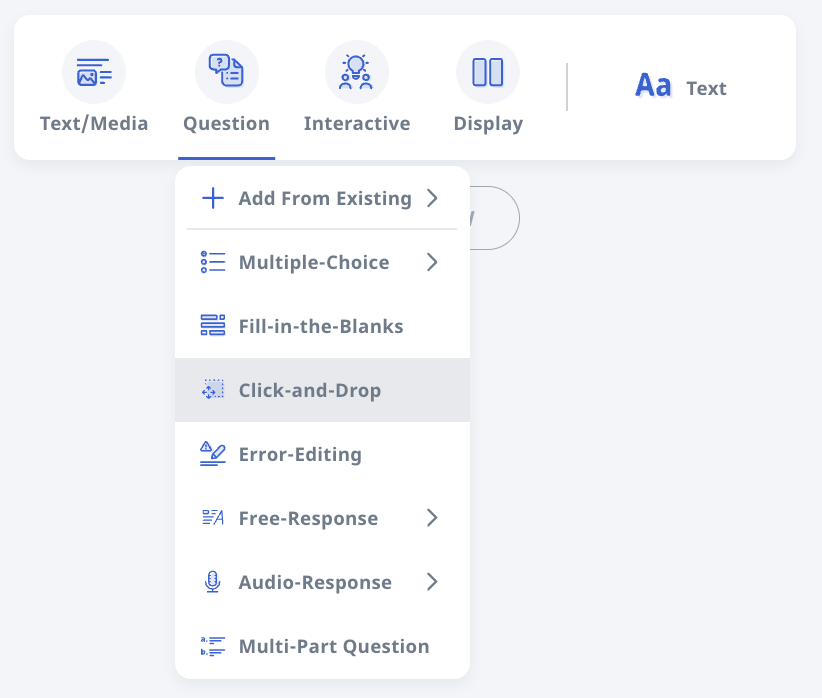
https://www.learning.moe.edu.sg/teacher-user-guide/author/add-click-and-drop-questions/
One of the most effective methods is the 🖱️ Click-and-Drag question format, where users can 🎯 drag options onto a 🖼️ canvas, simulating real-world interactions. However, manually creating such quizzes can be ⏳ time-consuming and technically challenging for 👨🏫 educators. To address this, I developed an intuitive 🌐 web-based Click-and-Drag Quiz Generator that allows users to ✍️ design, 👀 preview, and 📤 export quizzes effortlessly.

This 📖 blog post will take you through the entire 🔧 creation process, covering the 🔬 technical implementation, 🤖 AI-powered automation, and 🎨 user-centric design improvements. Additionally, I will showcase the Master Prompt, which enables AI to generate the entire interactive system. The goal is to not only 🤩 impress with the technical execution but also highlight how this tool makes quiz creation highly ⚡ efficient, 🔄 adaptive, and 🎓 accessible for educators worldwide.
🔥 Key Features of the Click-and-Drag Quiz Generator
- 🛠️ User-Friendly Quiz Creation: Upload a 🖼️ base image, add 🎯 draggable options (text or images), and define ✅ correct answers in just a few simple steps.
- 👀 Live Preview & Testing: Drag options onto the canvas to 🧪 test the quiz before exporting, ensuring a smooth user experience.
- 📂 Seamless Export & Import: Save quizzes as 📦 ZIP files, including all 🖼️ images and configurations, and 📥 re-import them for further edits.
- 📐 Adaptive Canvas Sizing: The quiz dynamically adjusts to the 📏 iframe/container size for an optimal, 🔍 scroll-free viewing experience.
- 🏫 SLS Compatibility: Designed for easy 🔗 integration into Student Learning Space (SLS) with sendScore https://www.learning.moe.edu.sg/teacher-user-guide/author/html5-content-development/ capability for 📊 tracking quiz performance.
- 📱 Mobile Optimization: Full support for ✋ touch interactions, ensuring 📶 accessibility across multiple devices.
- 🎯 Advanced Hotspot Functionality: Users can define ✅ correct answer zones, set 🏆 scoring rules, and visually customize 🎨 hotspot placements.
🤖 The Master Prompt: AI-Powered Generation of the Interactive System
To maximize ⚡ efficiency and automation, I engineered a Master Prompt that allows AI to generate a fully functional Click-and-Drag Quiz Generator in HTML, CSS, and JavaScript. This removes the need for 🖥️ manual coding, making the tool accessible to a wider audience of 📚 educators and 💻 developers.
📝 Prompt Breakdown
1️⃣ Introduction and Context
- Clearly define the purpose: "Generate an interactive Click-and-Drag Quiz Creator in HTML, CSS, and JavaScript."
- Specify the key objectives: user-friendly design, mobile responsiveness, hotspot validation, and export-import functionality.
2️⃣ Core Functionalities
- 🖼️ Canvas Setup: Dynamically scale the canvas to fit the available screen space while maintaining a smooth interactive experience.
- 🖱️ Drag-and-Drop System: Enable draggable ✍️ text and 🖼️ images that snap to predefined 🎯 hotspots, ensuring an intuitive interaction model.
- 🎯 Hotspot Logic: Ensure ✅ correct validation of dropped options, allowing for automated 🏆 grading.
- 👀 Live Preview: Provide a way to 🧪 test interactions before exporting, reducing errors in quiz configuration.
- 📤 Export & 📥 Import Logic: Store quiz data in a structured 📜 JSON format within a 📦 ZIP file for seamless saving and loading.
- ⚠️ Error Handling: Ensure robust ❌ error handling for incomplete or incorrectly formatted quizzes.
3️⃣ Code Structure Specification
- 📄 HTML: Define a structured 🖥️ UI with distinct sections for creating, previewing, and exporting quizzes.
- 🎨 CSS: Apply modern styles for a clean, responsive, and visually appealing interface.
- 💻 JavaScript: Implement interactive features such as cropping images, managing 🎯 hotspots, and drag-and-drop mechanics.
- 💾 Data Persistence: Ensure that quizzes can be saved and reloaded without data loss, improving usability.
4️⃣ Optimization & User Experience Enhancements
- 📱 Mobile & 🖥️ Desktop Compatibility: Ensure seamless operation across different devices and screen sizes.
- ⚡ Performance Optimization: Implement efficient rendering techniques to handle large quizzes without lag.
- ♿ Accessibility Considerations: Design the UI and interactions with best practices to support diverse user needs.
- 🏆 Custom Scoring Mechanisms: Allow educators to define point values for different questions based on difficulty levels.
🔧 Technical Implementation: Step-by-Step Breakdown
1️⃣ Designing the UI
The interface is structured using a 🗂️ tab-based system, allowing users to switch between creating, previewing, and exporting quizzes seamlessly. The design is clean, with clear buttons and instructions to enhance usability.
2️⃣ Implementing the Canvas System
The canvas dynamically resizes to match the iframe or container, ensuring that users do not need to scroll in any direction. This improves the visual experience and usability across various screen sizes.
3️⃣ Adding Drag-and-Drop Support
Each option (text or image) is made draggable, and JavaScript event listeners track when an item is placed onto a hotspot. The system provides immediate feedback by visually confirming correct placements.
4️⃣ Enabling Live Preview
Users can test their quiz in real-time by dragging options onto the canvas before finalizing their export. The preview mode highlights correct and incorrect placements to help refine the quiz settings.
5️⃣ Implementing Export and Import Functions
A 📦 ZIP export function packages the quiz data into a structured JSON file along with images, ensuring that everything is saved correctly. The import function reads the ZIP file and reconstructs the quiz exactly as it was before, allowing users to continue editing without starting over. This significantly improves efficiency for educators who build quizzes over multiple sessions.
🚀 The Future of Interactive Quiz Creation
This Click-and-Drag Quiz Generator represents a major advancement in efficient and scalable quiz authoring. The AI-powered Master Prompt ensures that anyone, regardless of their technical background, can generate a fully functional interactive quiz system within seconds.
Looking ahead, I plan to enhance this system further by:
- 🤖 AI-powered quiz question generation to reduce manual input and expedite quiz creation.
- ⏳ Timed quizzes to simulate real-world assessment scenarios.
- 📊 An analytics dashboard for tracking quiz performance and student engagement.
- 🎨 Enhanced customization such as background themes and font styling for different educational contexts.
🏆 Final Thoughts
The future of interactive quiz creation lies in 🤖 automation, ⚡ efficiency, and 🔄 adaptability. This Click-and-Drag Quiz Generator is just the beginning of a new wave of AI-assisted educational tools that will empower educators to create immersive learning experiences faster than ever before.
If you're interested in implementing this system, collaborating on improvements, or exploring new AI-driven learning solutions, let’s connect and push the boundaries of digital education together! 🎓🔥
Example
 |
| xAPI scores sent to SLS natively 4/4 quizG1ScienceEatingDragandDrop.zip quizG1ScienceEatingDragandDrop/ |
 |
| quizG1ScienceEatingDragandDrop.zip quizG1ScienceEatingDragandDrop/ |
No comments:
Post a Comment